Private by design
Your health data stays on your iPhone.
No account, no servers for your health data, no analytics. Auralo reads Apple Health and works everything out on your devices. Nothing leaves unless you send it.
- No account
- No servers
- No analytics
Where your data goes
From Apple Health to your answer, on your iPhone.
Your Watch and other apps write to Apple Health. Auralo reads it there, works out your scores, and shows them on your iPhone, Watch and widgets. Your iPhone and Watch talk to each other directly.
- No account: no email, no password, no sign-up
- No servers for your health data
- No analytics, ads or ad trackers
- Apple HealthYour Watch and apps write here
 Auralo, on your iPhoneEvery score is worked out here
- Your morning answerOn your iPhone and Watch
Our servers get none of it.
What can leave
Only what you send, and you see it first.
A few things can leave your iPhone. Each one starts with you.
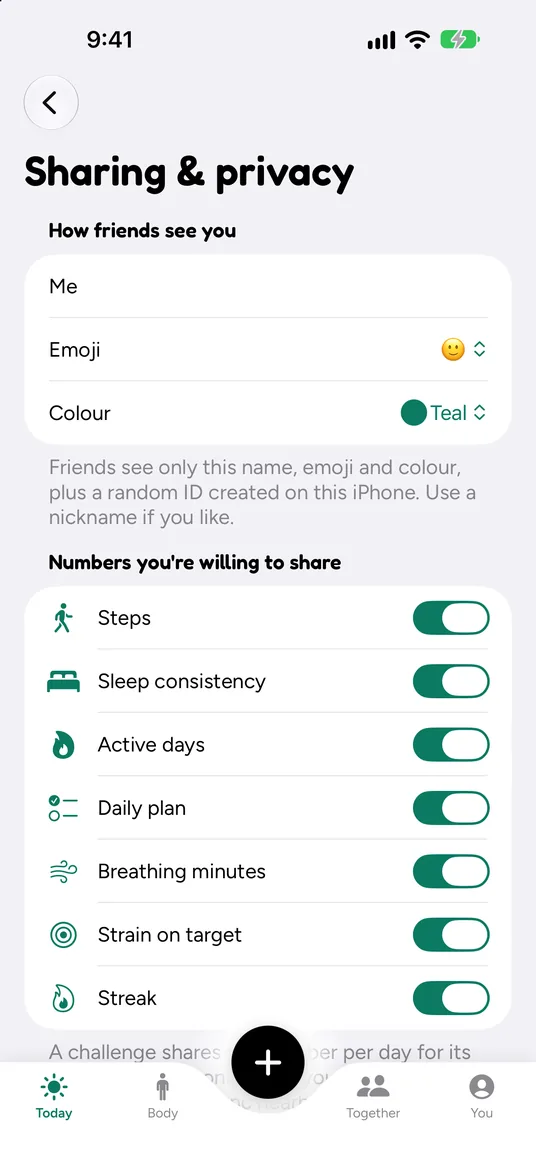
Challenges you send
Over Messages, a link, nearby sync or SharePlay. You see the exact numbers before they go.
Files you export
CSV, JSON or a PDF report, made on your iPhone and saved where you choose.
Weather, if you turn it on
Off by default. Your approximate location goes to Apple Weather for hot-day advice.
Your cycle, never
Cycle tracking is opt-in. It never reaches widgets, your Watch, notifications or share cards.
The full details, including Auralo Drip for Mac, are in our privacy policy.
Questions, answered.
Does Auralo need an account?
No. There’s no email, password or sign-up. Auralo+ goes through your Apple Account and the App Store, so we never see your payment details either.
Does Auralo upload my health data?
No. Auralo reads from Apple Health and works out every score on your iPhone and Apple Watch. We run no servers for your health data, and there are no analytics or ad trackers in the app.
What happens when I share a challenge?
You choose how: Messages, a link or QR code, nearby sync, or SharePlay. Before anything goes, Auralo shows the exact numbers that will be sent, like your daily steps and a nickname. Friends see only those, plus a name, emoji and colour you pick.
Can I export or delete my data?
Yes, any time. Export your history as CSV, JSON or a PDF report, made on your iPhone. Delete all data removes what Auralo stores, on your Apple Watch too. What’s in Apple Health stays in Apple Health, under your control.

Your mornings, kept to yourself.
Free for iPhone and Apple Watch. No account.
Download on theApp Store