Today’s plan & your week

A plan for today that ticks itself off.

One move and a few small things, made each morning from your recovery, sleep and week. Your run, steps and bedtime check off when Apple Health saves them. You don’t log a thing.

  • Free
  • No account
  • iPhone and Apple Watch
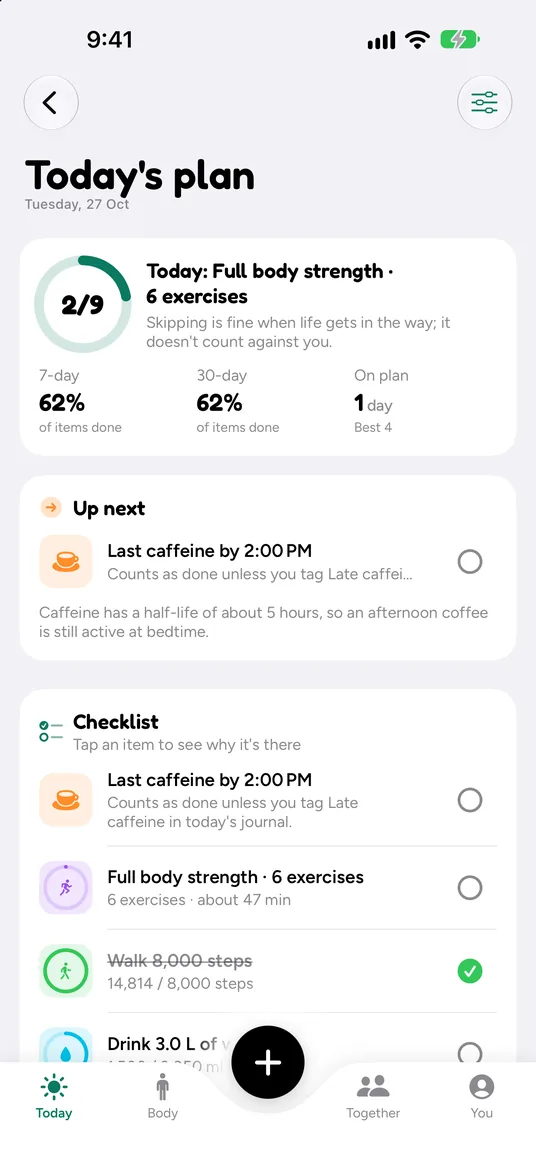
Today’s plan: full body strength, 6 exercises, 2 of 9 items done, 62% done over 7 and 30 days. Up next: last caffeine by 2 PM. The checklist includes full body strength, about 47 minutes, and walk 8,000 steps, ticked at 14,814.

How it works

Made in the morning. Done by evening.

  1. Step 1

    A plan for today

    Today’s session, steps, water, a caffeine cut-off and a bedtime. Each item says why it’s there.

  2. Step 2

    Live your day

    Your Watch, your phone and your other apps save to Apple Health as usual.

  3. Step 3

    It ticks itself off

    Items check off as the data comes in. Skip one when life gets in the way; it doesn’t count against you.

Your week

A training week that bends around you.

Pick a goal, or plan each day yourself. Every morning it checks the week against how you slept and recovered.

  1. Your split

    Push, pull, upper body, lower body, full body, cardio or rest on each day, or a saved routine on a day.

  2. Re-planned each morning

    Low recovery moves a hard session to a later day, and says why. Drag a session to swap it yourself.

  3. Grows gently

    Weekly load rises by no more than 10%, with an easier week every fourth week.

  4. Plan by distance

    Pick a distance for a run, walk, ride or hike and see the time and effort from your recent workouts.

In the app

On your wrist, and in step with you.

Your day on your Apple Watch

The plan with times, ticking off as you go. A Your day widget and complication show what’s next.

  • Swap any task for one that suits your day, or change its target
  • Strength sessions open the logger with the planned exercises
  • Turn off items you don’t need, like the caffeine cut-off if you don’t drink coffee
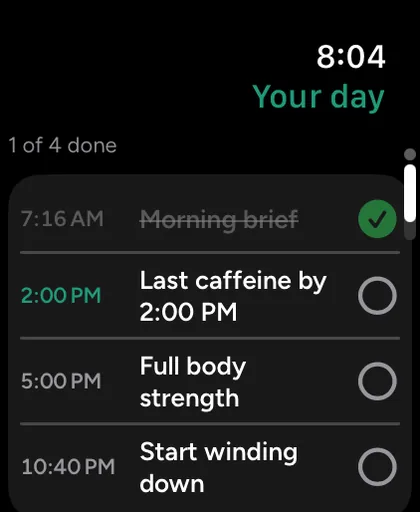
Apple Watch Your day page, 1 of 4 done: morning brief at 7:16 AM ticked, then last caffeine by 2:00 PM, full body strength at 5:00 PM and start winding down at 10:40 PM.

Plans that can follow your cycle

Off by default. If you log periods in Apple Health and turn it on, the few days before a period get a slightly lighter effort goal and a bedtime about 12 minutes earlier.

  • Estimated on your iPhone from the periods you log
  • Your cycle is never shown on widgets, your Watch, notifications or share cards
  • Wellness guidance, not contraception or fertility advice
  1. Periods you logIn Apple Health
  2. A small change to todayWorked out on your iPhone

Nothing leaves your iPhone.

Free and Auralo+

Your plan is free, every day.

Auralo

$0free forever
  • Today’s plan that ticks itself off
  • Your week, your split
  • Morning re-plan around your recovery
  • Plan by distance
  • Cycle-aware plans, if you turn them on

Auralo+ 2 weeks free

$1.99a month, or $19.99 a year

Guided programs: multi-week plans that bend around your recovery, one small step a day.

  • Everything in Auralo
  • Big day and jet lag plans
  • 90-day and 1-year history

US prices. The App Store shows your local price. Cancel any time in Settings.

What Auralo+ adds

Questions, answered.

How does the plan tick itself off?

From Apple Health. Steps, water and protein tick off when they reach the target. A workout counts when a matching one is recorded for at least half the planned time, or when you log a strength session. Bedtime is checked the next morning. You can always mark an item done or skip it yourself.

What if I miss a session?

Nothing to make up. The next morning Auralo re-plans the week: a missed hard session moves to a later easy day if one fits, or is dropped. Skipped items don’t count against you.

Can I plan my own training week?

Yes. Choose push, pull, upper body, lower body, full body, cardio or rest for each day, or put one of your saved routines on a day, like your push routine every Monday. Drag a session to another day to swap them.

What are cycle-aware plans?

An option, off by default, if you log periods in Apple Health. In the few days before a period, the effort goal is a little lighter and bedtime about 12 minutes earlier. The estimate is made on your iPhone and nothing leaves it. It’s wellness guidance, not contraception or fertility advice.

Know what to do today, and let it tick itself off.

Free for iPhone and Apple Watch. No account.

Download on theApp Store