Strength log & muscle map

See which muscles are ready before you lift.

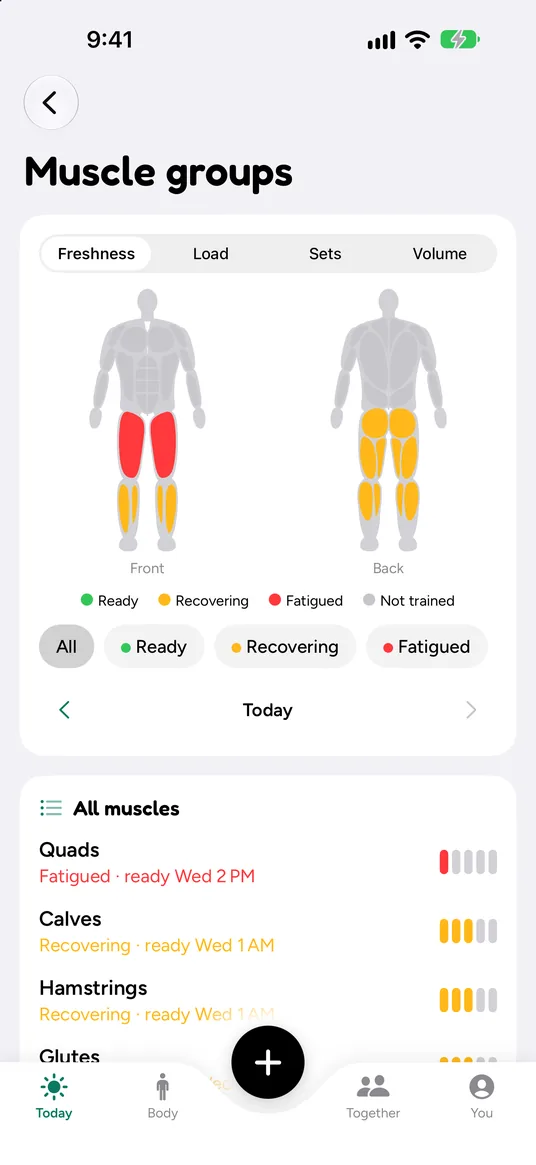
Log your sets, and Auralo marks every muscle as ready, recovering or tired. So you know what to train today, and what to leave for Thursday.

  • Free
  • No account
  • iPhone and Apple Watch
Muscle groups screen: front and back body map with quads tired and calves, hamstrings and glutes recovering. Below, a list: quads fatigued, ready Wednesday 2 PM; calves recovering, ready Wednesday 1 AM.

How it works

Three steps, and the last one is just looking.

  1. Step 1

    Log your sets

    Reps, weight and how hard it felt. What you lifted last time sits beside every set, and the rest timer shows on your Lock Screen and Apple Watch.

  2. Step 2

    The map updates

    Every muscle, front and back, gets a freshness score from your last 7 days. Runs, rides and hikes count toward your legs too.

  3. Step 3

    Train what’s ready

    Today’s training card says it plainly: legs still recovering, upper body is a good fit. If a planned session hits tired muscles, it offers a gentler option.

In the app

A strength log that knows the rest of your day.

Your lifting sits next to your sleep, recovery and runs. Nothing is counted twice.

Every session, in plain numbers

After a session you see how much work each muscle did and what it added to your day.

  • Muscular load from sets, weight and effort
  • Volume per muscle, so you can see if hamstrings got any work
  • Estimated max lift for each exercise, from your best set
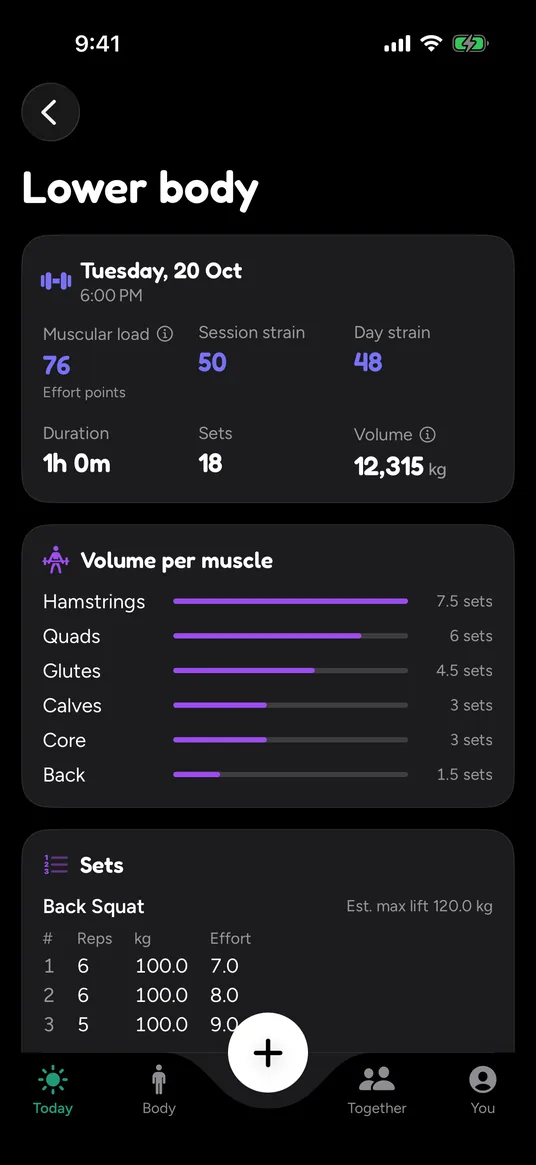
Lower body session in dark mode: muscular load 76, session strain 50, 18 sets, volume 12,315 kg, then volume per muscle with hamstrings at 7.5 sets and back squat sets of 100 kg.

Logging that stays out of the way

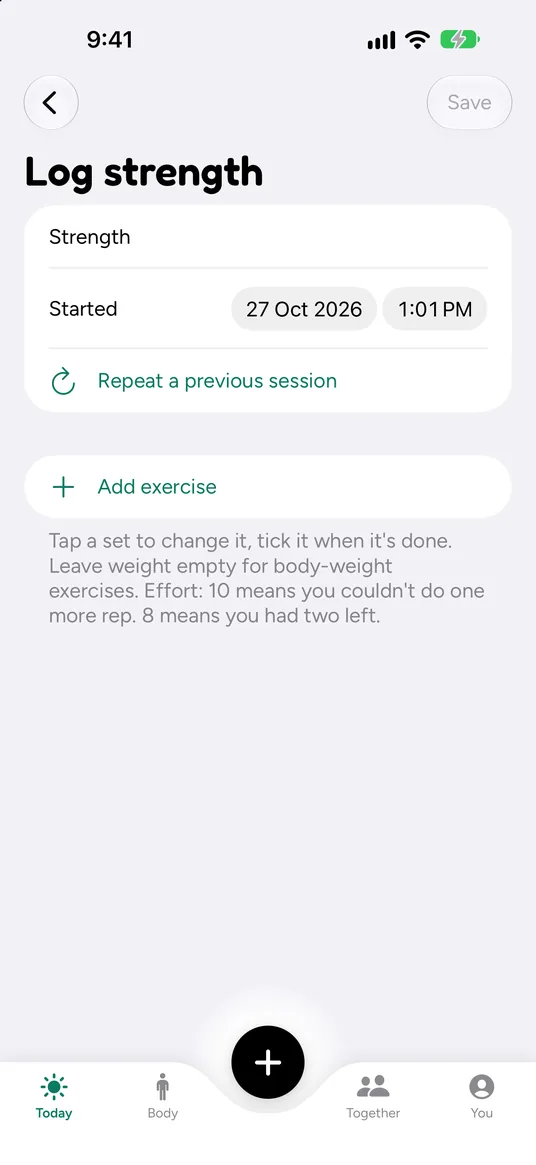
Add an exercise or repeat a previous session in one tap. Tap a set to change it and tick it when it’s done.

  • Leave the weight empty for body-weight moves
  • Effort from 1 to 10: 10 means you couldn’t do one more rep
  • Add your own exercises if one is missing
Log strength screen: start date and time, Repeat a previous session, Add exercise, and a note explaining effort: 10 means you couldn’t do one more rep, 8 means you had two left.

Lifting counts toward your strain

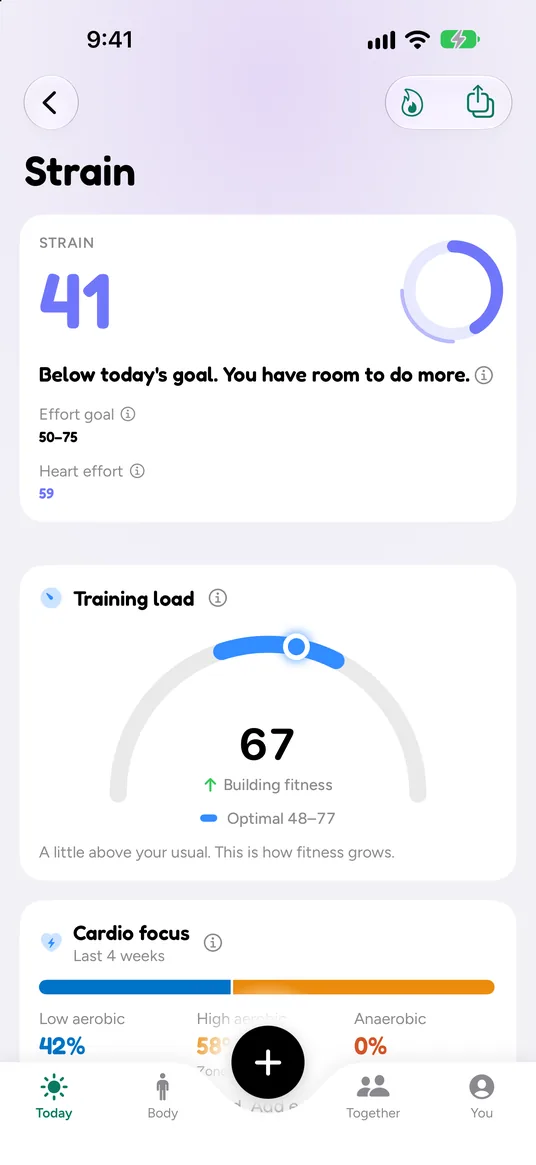
A strength session adds to today’s strain and your training load. If your Apple Watch also recorded the workout, Auralo counts it once.

  • An effort goal for the day, set by your recovery
  • Training load against the range that builds fitness
Strain screen: strain 41, below today’s goal of 50 to 75, with the note You have room to do more. Training load 67, optimal 48 to 77, building fitness.

Switching is easy

Import from Hevy or Strong.

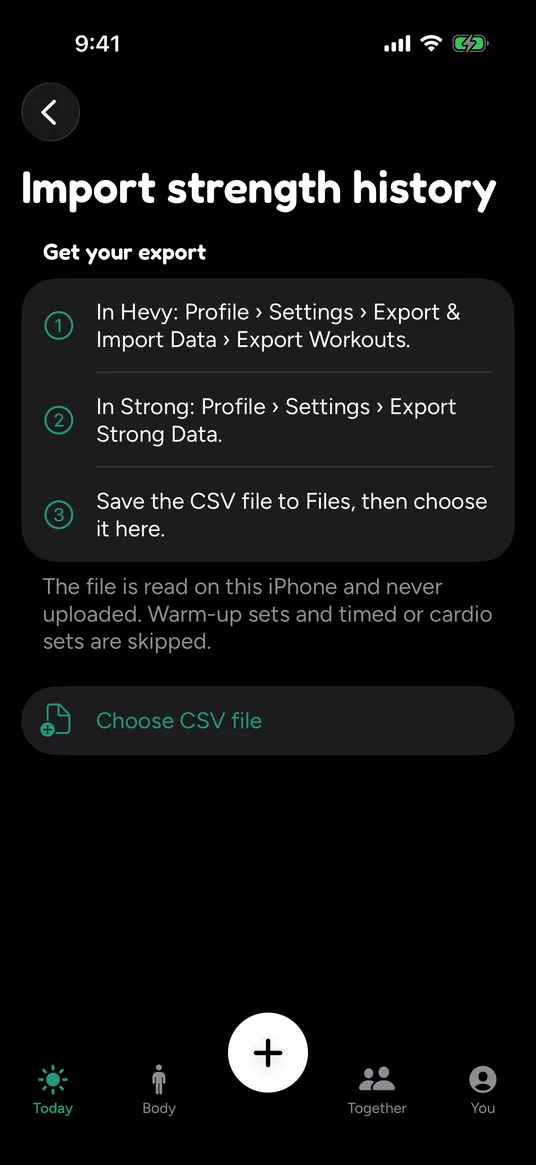
Keep your history. Export a CSV from either app and Auralo reads it, so your “last time” and the muscle map are right from day one.

  1. In Hevy: Profile › Settings › Export & Import Data › Export Workouts
  2. In Strong: Profile › Settings › Export Strong Data
  3. In Auralo: save the file to Files, then choose it

The file is read on your iPhone and never uploaded. Warm-up sets and timed or cardio sets are skipped.

Import strength history screen with three steps for exporting from Hevy and Strong, a note that the file is read on this iPhone and never uploaded, and a Choose CSV file button.

Free and Auralo+

The log and the map are free.

Auralo

$0free forever
  • Strength log with last time beside every set
  • Muscle map, front and back
  • Rest timer on Lock Screen and Apple Watch
  • Import from Hevy or Strong
  • Strength counted in strain and recovery

Auralo+ 2 weeks free

$1.99a month, or $19.99 a year

When to add weight: a quiet nudge in the strength log when your last sessions say you’re ready for a little more.

  • Everything in Auralo
  • Guided multi-week programs
  • 90-day and 1-year history

US prices. The App Store shows your local price. Cancel any time in Settings.

What Auralo+ adds

Questions, answered.

Do I need an Apple Watch for the muscle map?

No. You log sets on your iPhone, and the map works from those. An Apple Watch adds heart rate, so a strength session also counts toward your strain. Runs, rides, hikes and walks from any app that writes to Apple Health add leg work to the map too.

How does Auralo decide a muscle is ready?

It looks at the sets you ticked in the last 7 days: reps, weight and how hard each set felt. The main muscle of an exercise gets the full set and helper muscles get half. That fatigue fades over about 3 days for big muscles like quads and back, and about 2 days for smaller ones like arms and calves. A muscle reads tired when the load is high for you, compared with your own usual sessions.

Can I bring my history from Hevy or Strong?

Yes. Export a CSV from Hevy or Strong, save it to Files, and choose it in Auralo. The file is read on your iPhone and never uploaded. Warm-up sets and timed or cardio sets are skipped.

Is the strength log free?

Yes. The log, the muscle map, the rest timer and Hevy or Strong import are free, with no account. Auralo+ adds a quiet nudge for when to add weight, and 90-day and 1-year history. It’s $1.99 a month or $19.99 a year in the US, with a 2-week free trial.

Know what’s ready before you pick up a weight.

Free for iPhone and Apple Watch. No account.

Download on theApp Store