
Strain & training load

Know how hard to push today.

An effort goal set by this morning’s recovery, and a gauge for the last few weeks. So you can tell room to do more from time to stop.

  • Free
  • No account
  • iPhone and Apple Watch
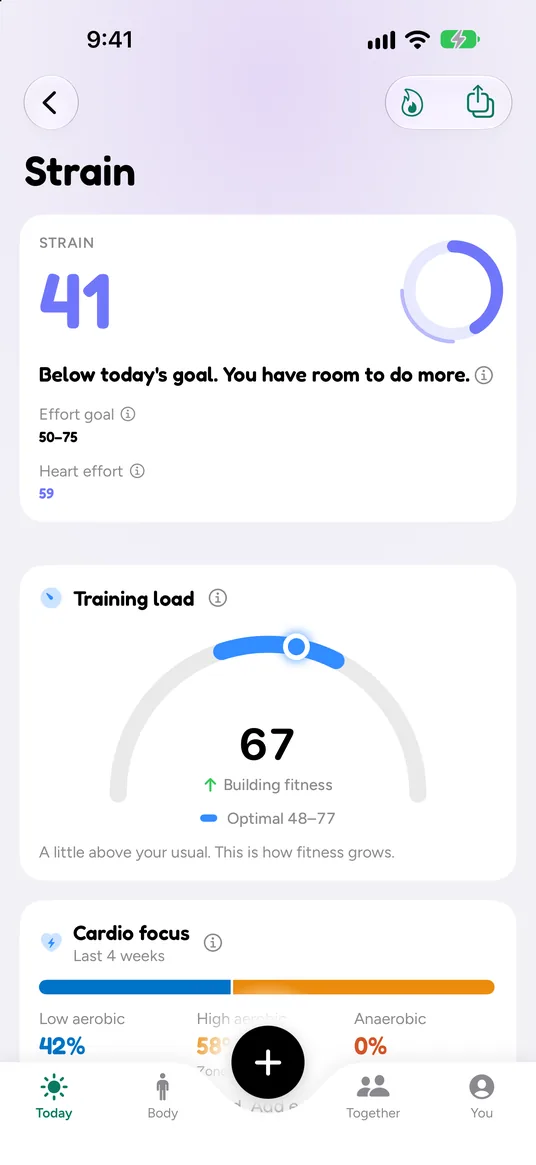
Strain screen: strain 41, below today’s goal of 50 to 75, with the note You have room to do more. Training load 67, optimal 48 to 77, building fitness. Cardio focus over the last 4 weeks: 42% low aerobic, 58% high aerobic.

How it works

Today’s effort, against a goal made for today.

  1. Step 1

    Every effort counts

    Workouts and the rest of your day from heart rate, and strength from your sets. A session your Watch also recorded counts once.

  2. Step 2

    A goal from recovery

    Recovered well, the range goes up. Running low, it comes down. It learns how your body usually takes a hard day.

  3. Step 3

    Room, or time to stop

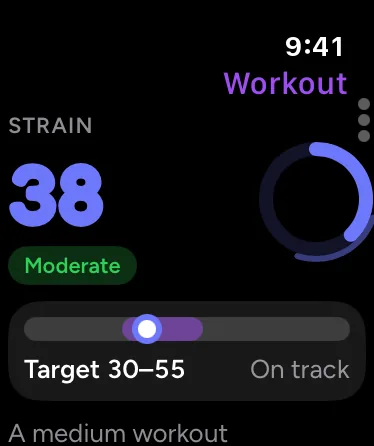
    See where you are through the day, and get a short note after a workout with your strain against today’s goal.

Training load gauge

Building fitness, or overdoing it.

Your last 7 days against your last 28. One word for where you are, and the range that builds fitness.

  1. Detraining

    Well below your usual load, like an easy week.

  2. Steady

    About your usual load.

  3. Building fitness

    A little above your usual. This is how fitness grows.

  4. Overreaching

    Well above your usual. Today’s plan eases off until it settles.

In the app

Know what kind of training you’re doing.

Cardio focus and heart-rate zones

Your last 4 weeks split into low aerobic, high aerobic and all-out work, with a plain takeaway, like base building or a good mix.

  • Zones your way: share of max heart rate, heart-rate reserve, lactate threshold, or your own
  • Time in each zone for every workout and the whole day
  • Plan by distance: pick a run, walk, ride or hike and see the time and effort from your recent workouts

More on today’s plan and plan by distance

Apple Watch Workout page: strain 38, Moderate, with a target of 30 to 55 and the note On track.

Free and Auralo+

Strain and load are free.

Auralo

$0free forever
  • Daily strain with an effort goal
  • Training load gauge and cardio focus
  • Heart-rate zones, four ways
  • Plan by distance
  • Strength counted once, with no double counting

Auralo+ 2 weeks free

$1.99a month, or $19.99 a year

Guided programs: multi-week plans that bend around your recovery, one small step a day.

  • Everything in Auralo
  • Big day taper for a race
  • 90-day and 1-year history

US prices. The App Store shows your local price. Cancel any time in Settings.

What Auralo+ adds

Questions, answered.

What is strain?

How hard your heart worked today, on a scale from 0 to 100. It counts workouts and the rest of the day from your heart rate, and strength sessions from your sets. Each extra point takes more effort than the last, so 80 is a lot harder than 40.

How is today’s effort goal set?

From your recovery. A Go for it morning gets a higher range, a Recharge morning a lower one. Over time the goal shifts by up to 10 points, based on how your recovery usually responds to hard days.

What does the training load gauge mean?

It compares your last 7 days with your last 28. Below your usual reads Detraining, about the same reads Steady, a little above reads Building fitness, and well above reads Overreaching. It needs about four weeks of data before it shows a word.

Can I choose how heart-rate zones are worked out?

Yes. The default is a share of your maximum heart rate. You can switch to heart-rate reserve (Karvonen), a lactate-threshold split, or set the zones yourself. Every zone chart in the app follows your choice.

Push on the right days. Rest on the others.

Free for iPhone and Apple Watch. No account.

Download on theApp Store