Drip, your water buddy

Drink enough water, with a little help.

Drip works out a target for your day, reminds you on your schedule, and sits on your Lock Screen. A little thirsty when you’re behind. Happy when you’re on track.

  • Free
  • No account
  • Saved to Apple Health

How it works

A target, a schedule, and one tap to log.

  1. Step 1

    A target for you

    From your body, your workouts and your day. Or set your own number.

  2. Step 2

    Reminders on your schedule

    From waking to before bed, more in the morning, and around workouts. Never in quiet hours.

  3. Step 3

    Log from anywhere

    The + in any tab, a widget, the Lock Screen, a reminder, or your Apple Watch.

In the app

Water, wherever you look.

On your Lock Screen, and on your wrist

A Live Activity shows how much you’ve had, when the next glass is due, and a button to log it. It’s in your Watch’s Smart Stack too.

  • Widgets for the Home and Lock Screen, with a +1 glass button
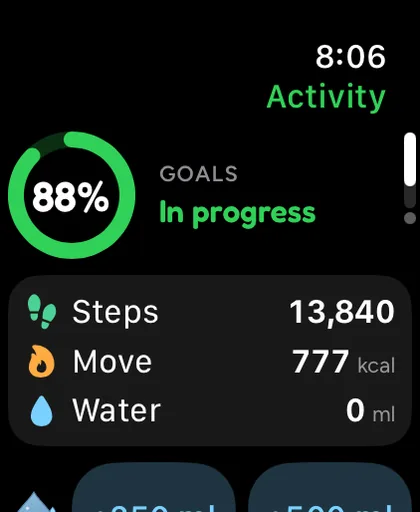
  • On your Apple Watch: water buttons on the Activity page, and Log it on a reminder
  • Counted once, wherever you log it
Apple Watch Activity page: goals 88%, in progress, with steps 13,840, move 777 kcal and water 0 ml, and water buttons below.

Drip’s moods

Drip’s face follows your day. Happy when you’re on track, a little thirsty when you’re about a glass behind, and celebrating when you reach your goal. Only then: Drip never cheers a missed goal.

  • Weather-aware target, if you turn it on: more water on a hot day
  • Why this target: every part of the number, in plain words

Free and Auralo+

Drip is free.

Auralo

$0free forever
  • A water target made for you
  • Reminders on your schedule
  • Live Activity, widgets and Watch
  • Log from any tab
  • Weather-aware target, if you want it

Auralo+ 2 weeks free

$1.99a month, or $19.99 a year

Custom widgets: pick the score and theme for each widget and watch complication.

  • Everything in Auralo
  • Extra looks and widget themes
  • 90-day and 1-year history

US prices. The App Store shows your local price. Cancel any time in Settings.

What Auralo+ adds

Questions, answered.

How is my water target worked out?

From your weight and height in Apple Health, your workouts, how active you are, and anything like alcohol, illness or travel. Coffee and tea count toward it. Tap Why this target to see the parts. Prefer a fixed number? Switch to Manual and set your own.

When do the reminders come?

Spread through your day, from when you wake until about 90 minutes before bed, with more earlier in the day and a nudge before and after a workout. They respect your quiet hours, and you can snooze one for 30 minutes. Reminders are off until you turn them on.

Does Drip use my location for the weather?

Only if you turn on weather-aware advice, which is off by default. Then your approximate location goes to Apple Weather, at most every 3 hours. On a hot day it adds 250, 500 or 750 ml to your target, depending on how hot it feels.

Where is my water saved?

In Apple Health, so your other apps see it too. Every glass is counted once, whether you log it on your iPhone, your Apple Watch, a widget or a reminder.

One glass at a time.

Free for iPhone and Apple Watch. No account.

Download on theApp Store